 DNS Unpacked
Resolvers and caching
The short version
- A recursive resolver is a server that looks up names for you.
- Your internet provider usually runs the one you use.
- The resolver keeps a copy of each answer for a while. This copy is its cache.
- Most lookups are answered from a cache, so they are fast.
- A resolver also remembers when a name does not exist.
What a recursive resolver does
In the last chapter, a resolver went from server to server to find an address. That is its whole job. It takes a question from your device and chases down the answer.[1]
"Recursive" just means it keeps going until it has a final answer. Your device asks once. The resolver does all the asking after that.
A resolver does not hold any domain's records itself. It only fetches them from the servers that do. Google's public resolver says this plainly: it is not the official source for any domain.[2]
Whose resolver are you using?
For most homes, the resolver comes from the internet provider.[3] Your device picks it up by itself when it joins the network.[4] You never have to set it.
You can choose a different one. A public resolver is one that anyone can use instead of their provider's.[5]
Google runs one, for example. Its addresses are 8.8.8.8 and 8.8.4.4, plus two IPv6 addresses.[4] Here they are on Google's setup page:
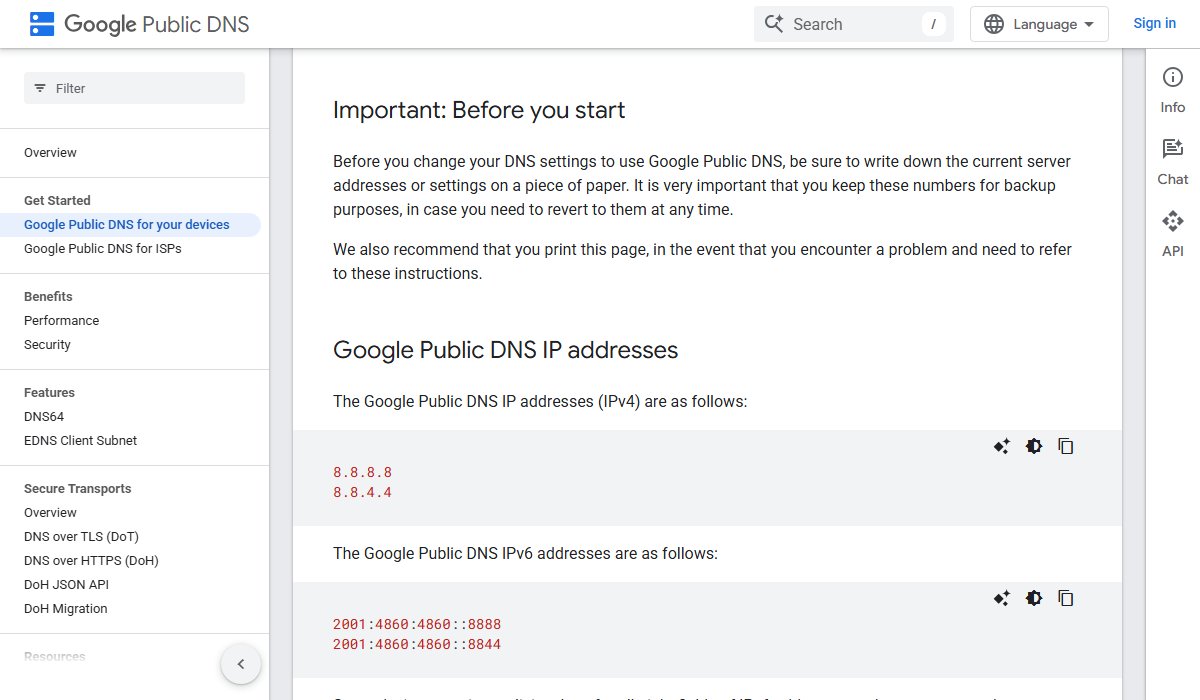
There are others too. For learning how DNS works, it does not matter which one you use. They all follow the same rules.
How caching works
A resolver is expected to keep the answers it gets.[6] The next person who asks the same question gets the saved answer. The resolver does not need to go out again.
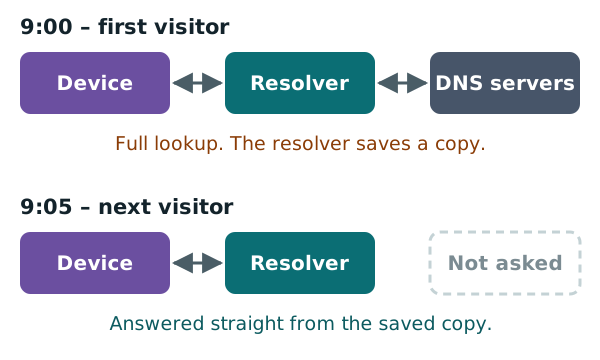
Here is an example. You visit www.example.com at 9:00. Your resolver does the full lookup and saves the answer. Your neighbour visits the same site at 9:05. Their lookup comes straight from the saved copy.
Big resolvers serve so many people that most answers come from cache.[2] That is why lookups usually feel instant.
How long is a copy kept?
Not forever. Every record comes with a time limit. It says how long a copy may be kept in a cache.[1]
That time limit is called the TTL, short for "time to live". When it runs out, the resolver throws the copy away. The next lookup fetches a fresh one.
This is why a DNS change can take a while to reach everyone. Some resolvers still hold the old copy. The chapter on TTL and propagation covers this in full.
Remembering what isn't there
Resolvers also remember "no" answers. This is called negative caching. It means storing the fact that something does not exist.[6]
For example, someone mistypes a name as wwww.example.com. That name doesn't exist. The domain's server says so, with an answer called NXDOMAIN. It means "no such name".[7]
The resolver keeps that "no" for a while too. That cuts down the number of questions sent to the server.[7] If ten people make the same typo, the resolver can answer nine of them itself.
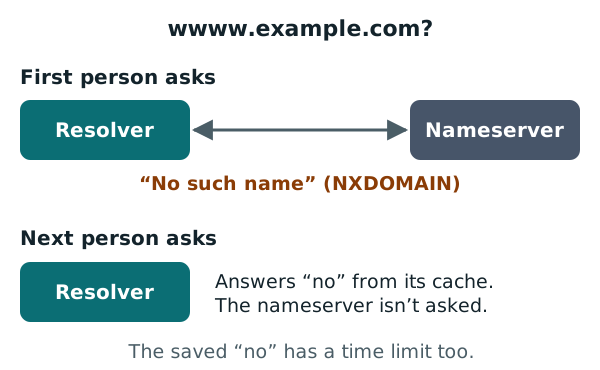
Negative caching used to be optional. Today, the standards say resolvers should do it.[7]
Why this matters when you add a name
Negative caching can catch you out. Say you look up shop.example.com before you have created it. The resolver saves the "no such name" answer.
Then you add the record. For a while, that resolver may keep telling you the name doesn't exist. It is still using its saved "no". But a "no" has a time limit too, just like a normal answer.[7] When it runs out, the resolver asks again.
Next: where the answers live
Resolvers fetch answers, but they don't hold them. The next chapter looks at the servers that do: the nameservers.
Sources
- RFC 1034: Domain names - concepts and facilities, IETF (accessed 2026-10-18)
- Introduction to Google Public DNS, Google for Developers (accessed 2026-10-18)
- Domain Name System, Wikipedia (accessed 2026-10-18)
- Get Started: Google Public DNS, Google for Developers (accessed 2026-10-18)
- Public recursive name server, Wikipedia (accessed 2026-10-18)
- RFC 8499: DNS Terminology, IETF (accessed 2026-10-18)
- RFC 2308: Negative Caching of DNS Queries (DNS NCACHE), IETF (accessed 2026-10-18)